Wednesday, November 18, 2009

The Power of a Pretty Hello

Cheeky Secret #10
A Good Blog Header is EVERYTHING.
*
The other day, while walking into my children's school, I walked past five different women. The first tossed out a muffled hello as I walked by. The second glanced my way. She may have nodded her head slightly in my direction, but then again, she could have just been stylishly tossing her hair off of her forehead. Ladies number three, four and five didn't even bother to glance in my direction as we crossed paths.
*
By now, I'd reached the front door, stretched my hand out to open it, when a hand grabbed the door before I could and a cheery voice said behind me. "Here! I'll get that for you. I have to tell you, I saw you walking from all the way back there, and that necklace your wearing! It just caught my eye! It's gorgeous!" Stunned, I turned around and caught myself staring right into the face of some woman I'd never met. Her eyes were lit with happy energy, a smile donned her cheeks, her teeth stood tall and straight, saluting a friendly hello. Instantly, I warmed to her. I loved this woman. We had to be friends. Following her into the school, we chatted back and forth with comfortable banter until we moved our routine ways--me feeling significantly better about my day than I had just moments before I'd run into her merry little soul.
*
Your blog header is your greeting. How is it saying hello to your readers?
When new visitors arrive at your site, your blog header is the first greeting they get.
It tells them the tone of your blog, the content, the style, the personality.
I believe having a professional looking blog header is as important to attracting new readers as having a smart marketing plan. Of course, you've got to have rocking content and graphics to permanently hook a reader. But, that vital first meeting can be VERY swayed by the power of your header hello.
*
Here is an example. For several months, I've been in contact with a lovely Tongue-N-Cheeky reader, Patti. She's been the dear of all dears, emailing me often with words of support and encouragement. It's always a pleasure to hear from positive people.
*
Patti runs a really great blog with a really great title, "Anatomy of A Dinner Party." Doesn't that just ring in your heart? I was instantly impressed with her concept. The title was fascinating, it grabbed my attention, made me want to see what she was up to. But, when you visited her blog, the graphics suggested that she was fresh to blogger, learning her way around the program and posting. (Which is OKAY, we all have to start somewhere. That's for SURE!) Wanting to give her an extra boost with her fantubulous blog, and knowing what a difference a few good graphics make, I offered to create a header for her.
*
Notice the different ambience each header creates.
*
Anatomy of a Dinner Party
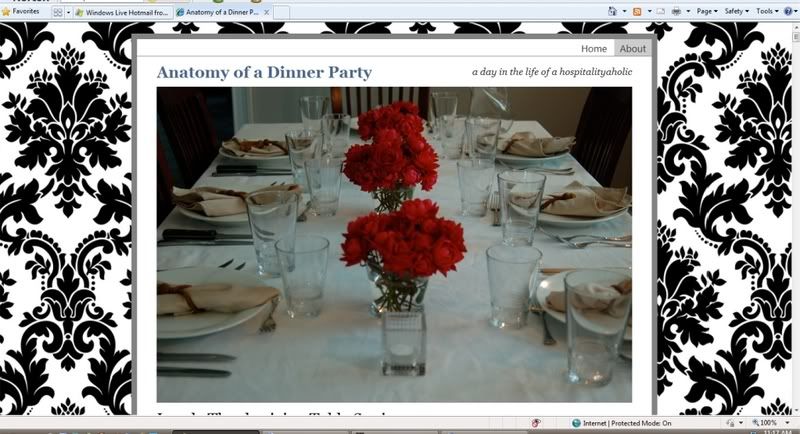
BEFORE....
Patti had worked diligently to set up her blog with a nice looking blogskin and a well-organized posting format. Her header consisted of a nice photo of a lovely dinner party (LOVE those centerpieces!) However, the photo was rather large, with the color being somewhat muted. Wouldn't it be nice to have a graphic that evokes all the refined splendor of a dinner party? Something that truly expressed the sound of "Anatomy of A Dinner Party" in a visual way? I played with a few ideas, then sent Patti a potential blog header, pending her approval. She was gracious-as-can-be upon recieving it, and put it in place immediately.
*
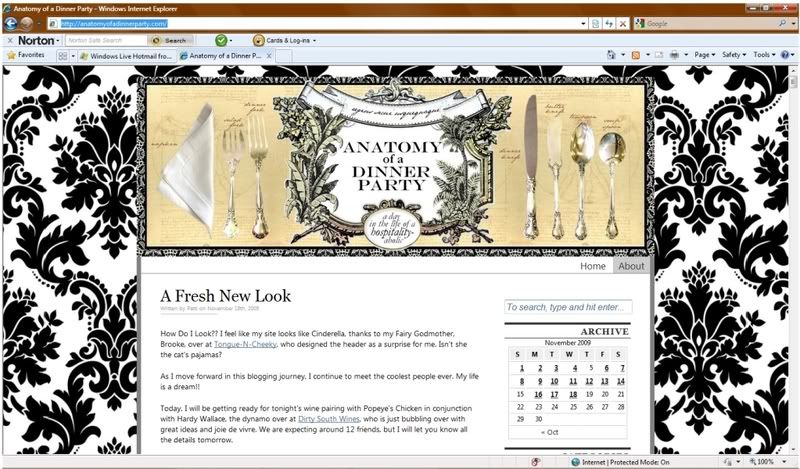
Here is the Anatomy of A Dinner Party AFTER the header makeover....

Isn't the difference remarkable?!
Before, Anatomy of A Dinner Party appeared to be a nice-looking operation.
Now, Anatomy of A Dinner Party looks like a high-end, finely stylized approach to blogging about truly sumptuous, thoughtful parties. (Which, by the way, is exactly what it is! Go Patti!)
*
So, how do you go about getting a fabulous header of your own?
First, Create one.
There are many programs that will allow you to create a nice-looking graphic, but I'd suggest using my favorite, free software PHOTOFILTRE.
*
Second, Hire someone.
Many blog design companies will customize blogskins and blog headers, but (in my experience) such services will run you more than $100 a pop. Which is why I'm excited to announce that, for a limited time, I am creating customized blog headers for only $35!
A good blog header is too important to have, and not easy enough to come by. I simply can't bear to insist of the importance of a nice blog topper, without offering some sort of feasibly affordable option.
*
If you are interested in having me design a header for you,
please email me at BeCheeky@q.com
and Ill start working on your header immediately. The turnaround time for a custom header is about 1 week. Yayhoo! That means you're only seven days away from look blog-fabulous!
*
Three, Win One.
That's right! Win! Win! Win!
Leave a comment on this post for a chance to win one free
Cheeky Secrets Custom Blog Header
for the blog of your choice.
*Header will be designed and emailed to you in jpg. and/or gif format, which you can then upload into your blog account. I'll do the designing, you do the uploading and we'll all do the happy dance!
*
Happy Blogging!

Monday, November 16, 2009

On Getting Your Work Noticed


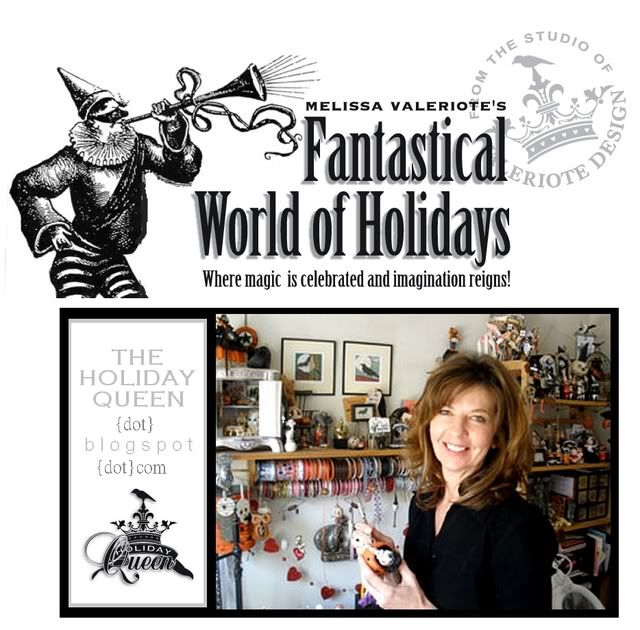
Owner of Valeriote Design, Melissa Valeriote has used a clever combination of online tools and social networking sites to build a storefront for her business. With a little business saavy and lot of hard work, she's also found tremendous success as a crafter and blogger, having recieved national media attention for many of her creations. So, I just had to know if she'd willingly share any of her secrets. Turns out, Melissa Valeriote is just as gorgeously wondrous as her delightsome art.

Melissa, you amaze! You've had your art published in magazines and on multiple websites, you've even been spotlighted in Martha Stewart's website. However did you turn your art into a successful venture that gets noticed?

Marketing yourself and your business is vital for every small business entrepreneur. Scheduling time for marketing is just as important as scheduling time for creating art. I spend 20 minutes every morning marketing on my blog, FaceBook, and Twitter. I'd suggest that you take full advantage of all the free social networking sites and research magazines, shows and companies that compliment what you create. Then make the call or send the email. Keep refining your mission statement and your presentation. Every contact is a potential customer. Be positive, be yourself, and present your best work.

You can read more of Melissa Valeriote's secrets to success, at her Decor-Medley interview, which can be found HERE.

Thursday, November 12, 2009

Photo Fantastic

Cheeky Secret #8
Get Fabulous Photos...for Free
*
The very best blogs are a perfect combination of sharp visuals, sharp writing, and sharp wit. Feel like you've got the chops to write and wittify the world, but falling short in the photography know-how department? Never you worry, my sweet. You're just a few clicks away from accessing some of the worlds most stunning stock photography. Best yet, you can do it without spending a single dime.
*
www.sxc.hu
*
SXC, or Stock.Xchng is hands down the finest free stock photography sites upon our living planet. Through it, talented artists submit their photographs or graphic designs to the website, offering thier work for download. Most of the photos are gigantically large, downloading with such glorious detail and clarity that even the nearsighted can toss their glasses whence they take a peek.
*
Do be sure, when using the website, to offer your feedback to the artists via the COMMENT box on each photo. Many of them are looking to improve their talent, or waiting to be discovered and a kind word of feedback is always welcome. Some artists also ask that you send them the link wherein their photos have been used. Keep your eye on the PHOTO DETAILS section (this box will appear in the upper right hand corner once you've picked on a favorite photo) to stay on top of the usage options.
*
Now go. Find photos that astound and amaze and get blogging your happy heart out.
*
Sooo many more secrets to come...

Saturday, November 7, 2009

How to Get Big, Crystal Clear Pictures On Your Blog

Cheeky Secret #7
Using Photobucket to Upload Fantastically HUGE Pics Into Your Blog
*
I'd heard from other bloggers that the only way to place big photos upon your blog was to use Flickr or Photobucket. Pshaw! I said to myself. Who has time?! Take a picture, find it on my computer, upload it to ANOTHER website,and THEN somehow pull it into my blog account?! Nay sirree. I'd rather just stick with the simple, and known method of using Blogger to upload my pics one by one into my actual account. At least the pictures are then right in front of my eyes, stuck right into my blog account, and immediately ready to use once I've uploaded them. At least I accomplish the entire task with one click from one site.
*
At least I could sit by and watch my life wither before my computer screen whilst I waited for each photo to upload one-by-one-by-one, resulting in blog pics sized to fit an antique locket. they are soo teensy via blogger, aren't they?!
*
If you've held onto the same sort of philosophy, I'm here to change thy mind, my friend. Photobucket and Flickr will not only give you some seriously gigantic photo options for your blog, but their slick sites actually make uploading your photos online and onto your blog tremendously quick, not to mention, easy.
*
Gone are the days of uploading single shots into Blogger, with enough time to brew a cup of hot tea and compose an opera between upload sessions (seriously. Doth it not take FOREVER to upload each little picture via blogger?) Gone are the days of attempting to find your way into the workings of html, tinkering with the photo settings, with the result being sorta-big, grainy pictures in place of your little, slightly less grainy ones.
*
With Flickr and Photobucket, you can upload a boatload of pictures in minutes, then paste them into your blog in no time at all. It's simple as pie and you're going to love the results!
*
While I adore Flickr, I've been using Photobucket because I can purchase a professional account on a month-by-month basis for a mere $2.99/mo. This PRO account makes it possible to upload oodles and oodles of photos to Photobucket each month, edit them, and access them for blogging. If you are only posting on your blog once a week, you'll likely find the limited storage available through a free Photobucket account is more enough to meet your needs. If, however, you are a graphics geek (such as myself), be sure to check into the PRO option on Photobucket, which will offers significantly more gigs of photo storage for pennies per day.
*
A Flickr tutorial will arrive shortly. In the meantime, here's how you use Photobucket to place big, bright, beautiful photos upon your blog...
*
(1)
Get a free Photobucket account by clicking HERE. Log into your account and click on the UPLOAD IMAGES & VIDEO'S button. Select a picture, or a group of pictures, to upload from your computer.

*
(2)
Once your photos have uploaded, add titles and tags as desired.

*
(3)
Click EDIT on any photo you may need to tinker with. Make any needed edits, then click SAVE or REPLACE ORIGINAL. If you don't want to edit any pictures, you can also return to your main page by clicking "WELCOME, ACCOUNT NAME" at the top of the screen. Once you've arrived at your account home page, click on the first photo you'd like to add to your blog.
*
(4)
Because I love big blog pictures, but think it's typically tacky and annoying when they are too honking huge to fit into a single computer screen, I resize most of my pictures to LARGE. You can do this by clicking RESIZE, then selecting your preferred image size.
*
Keep in mind, once you resize an image in Photobucket, it's permanently downsized. This is a one of my favorite things about Photobucket and here's why....if I publish a blog post, then view it and think one of my pictures is too big, I just have to go back to Photobucket and resize it to a smaller size. It will automatically downsize in my blog. Of course, this is also a point of caution. You can always resize to make your photos smaller, but you can't always resize them back to a larger size. To use maximize the resize feature, I think it's always best to choose a photo size just larger than the one you think you may actually need. Post it on your blog, then view it in published. If the photo is too big, it takes just seconds to return to Photobucket and downsize it to be a better fit. Of course, if you like the published size, voila! You're done. Hurrah!


*
(5)
With photo's uploaded, edited, and appropriately sized, it's time to post them into your blog. To do so, open a new tab in your browser and log into your Blogger account. Click NEW POST, then find your way to the EDIT HTML tag. Click on it. In that section, copy and paste the following code:


Now go back to Photobucket. Find the DIRECT LINK for your image (see example below). Copy it by highlighting it, then pressing CTRL+C. Return to your blogger account. In the HTML code that you've already pasted, highlight the entire text that sits between the quotation marks, then press CTRL+V to paste your Photobucket image link in it's place.
Repeat Step #5 as many times as needed, for as many pictures as needed.


*
(6)
In your blog account, return to the COMPOSE tab. Your Photobucket photos should be there awaitin' your arrival. Blog as you usual, post as usual, and enjoy your new, big, beautimous blog pics!


Friday, October 30, 2009

Fonts

Last week, one Sharilee emailed with this question...

My question is about the fonts. I've been told that you don't want to change your fonts since they won't show up on some computers. What do you think? How do you do it?

I totally agree that you don't want to mess with the standard fonts on your blog. First off, fancy fonts can't be seen on-screen by everyone who may tune into your blog because most computers have a difference set of offered or downloaded fonts. Second to that is this...I have no idea how to actually change the font on your blogger or wordpress account to something specialized and fancy. No idea.

Of course, there are ways to perty up your blog with fancy fonts. The first is, to increase or decrease the size of the fonts your blog program offers. And, of course you can change the color, too. I definitely recommend playing around with the provided fonts to discover which is your favorite. You'll likely find that some better fit your style than others. And, I happen to think a good blog will have a font that fits the tone and message it is sending.

In the beginning stages of my blog, I was madly in love with COURIER BOLD. I'd make it big, little, pink, cerulean. I adored that font first. But, soon I discovered it didn't have the same visual flow as GEORGIA. So, I switched, and I've been using GEORGIA ever since because I like the way it looks on screen. I think it evokes a more dressy tone that COURIER, and offers reader's the sensation of "reading a book" because of the way the type strings together letters.

Being a color fanatic, I definitely believe your blog is benefitted when you add little bits of color to your fonts. Not every word should scream hot-hued happiness, that's for sure, but a little color here and a little there can really improve the style and readability of your message. For instance, you can make an important word or phrase big. Or, an embarrassing admission teensy. You can MAKE YOUR WORDS ANGRY. Or, help them fall madly in luuuuurve. Don't those tiny bits of color offer a delightsome addition to your words?

Of course, if you try to make any of these changes on your own blog and they just don't seem to fit, then don't do it! It's important that you are staying true to your own personality and voice, as it comes through the blogwaves.

There is another way to create fabulous fonts. You can create an IMAGE...a jpg or bmp...then upload the image to your post. Through images, you've suddenly got a whole new world of written word possibilities. In my heart, I'm holding all sorts of opinions as to how to do this really, really well. Those will come soon enough. For now, let's start with a basic HOW-TO MAKE AN IMAGE demonstration. If you've already downloaded Photofiltre, you're ready to get fontaculous. If you don't yet have this wondrous, free program, you can find details HERE.

*
Once you've saved your new image, you simply have to upload it to your account using your standard image upload procedure.
*
Now....
Are you yet using Photobucket or Flickr? If not, it's time to get yourself a free account through one of those two sites. Within the week, I'll show you how to use these programs to upload big, fat, crystal-clear images into your blog.
And...more to come on how to make CA$H from your blog, too. There are just so many secrets to share!
*
Happy Fonting!

Wednesday, October 21, 2009

Finding Followers


*

Cheeky Secret #5
Get in good with the SITSta's.
*
It's likely you've already discovered the brilliant idea behind the blog The Secret is in the Sauce. If not, here's the DL in a jiffy...
*
The brainchild of two saucy gals, Heather and Tiffany, SITS offers community comment support by highlighting one blog a day four days a week. (The other days of the week spotlight giveaways, offer auction opportunities, and play host to a variety of clever marketing techniques.) As a SITS girl, you join their blog as a follower, then check in daily by leaving a comment. After leaving a comment, you also check the featured blog of the day, and typically try to visit the site of the blogger whose comment was left before yours. You also agree to post their button on your site. In exchange for maintaining your membership, SITS will eventually get around to spotlighting your blog for a day, directing other SITSta's to your main site, and two of your favorite posts. It's a relatively simple concept that works phenomenally well. Their program is more than four thousand bloggers strong, with an average of 200-400 comments left on their site each day. On top of helping other bloggers discover your site, it's a great way to find new, addictive sites to add to your morning blog route.
*
So, what's the secret, you ask?
Here it is...
The SITS site has been set up with a comment box which will pop up in the corner of your screen. Everyday, every SITSta who clicks on "LEAVE A COMMENT" will have this box pop-up on her computer screen. The comment boxes typically display the first two or three commentors messages. There! That's the secret.
*
Be one of the first three commentors and suddenly every one of the SITS girls who stop by the site for a check-in will see your name, photo, and the comment you've left in that pop-up comment box. They'll also have quick access to your blogger profile and blog links. While not all of the SITSta's leaving a comment will click on your information, you are more than guaranteed to pique the interest of a handful of new, potential readers who are interested enough to click and find out who you are and what your blog is about.
*
Of course, to make the most of this method, you've got to be sure you can grab the attention of any and all lookieloo's. To do so, make sure you:
*
(1) Have a catchy Screen Name with trendy, descriptive words.
"Jane Love Antiques" doesn't beg for attention nearly as much as "Vintage Jane."
Likewise, "Cupcake Conundrum" is much more likely to pull readers into your site that "Cathy Cooks."
Choosing a screen name which suggests your blog topic, style and voice is pertinent to "hooking" other bloggers and drawing them in for a first look at your site. Ideal screen names should be short, catchy, and interesting enough to entice other bloggers to want to know more about you and your site.
*
(2) Have an catchy photo on your profile.
Like the screen name, your profile photo is as much about marketing your blog as it is about showing the world who you are. Of course, the fact that most profile pics show up as a half-centimeter square makes choosing the perfect profile photo tricky. But, it's not impossible!
*
To find the perfect profile pic, begin by making a study of it. Look at the profile photos other bloggers have placed on their accounts and see which ones catch your eye. Are they faces? Graphics? Objects? The styles you find most interesting are likely interesting to other bloggers, as well, which means you now have a good gist of where to start.
*
Using a simple software program like Photofiltre can help you crop any photo worth profiling. CLICK HERE to get more information about this AMAZING free photo editing software.
*
(3) Get a good message.
Now that you have a good screen name and a knock-your-socks-off photo, you can also lure readers to your blog by leaving a noteworthy comment.
It shouldn't be long and it shouldn't be self-serving. The idea behind SITS is community support, not boastful marketing. So, you need to find a way to be complimentary to the SITS community while dropping a subtle, classy mention of your own blog.
*
For Instance:
Hiya Sits Gals! Happy Autumn Day!
Is it as brisk and brambly in your neck of the woods as it is mine? Yikes!
A cup full of Vanilla milk is sure to soothe the soul on these fall days.
Come on by for the recipe. I'd love to have you!
*
(4) First is the Best.
Now, the most ultimate SITS secret, eva.
Being in the top three to comment at SITS is such a successful tatic to bring new readers to your site that there are a host of gals who sit by their computer and watch the seconds tick away until the newest SITS post goes live. It's a competitive game, getting in the top three. But, you don't want to be just competitive. You want to win, right?
So, you're going to try to get your comment in the number one position on the SITS comment box.
To do so, you've got to trust my (rather absurd) but very successful method...
*
First, log into your google account. Once the new SITS post is up, you don't want to waste a single second having type in your username and password.
Second, type your message into a word document. Highlight the message and press CTRL+C to copy it.
Third, wait. The SITS gals used to post like clockwork, with the new entry going live every night at midnight. I think they got wise to the underground group of bloggers awaiting the coveted comment top spot so they started posting in a slightly less routine fashion. So, this waiting part is really a waiting game. Go to http://www.thesitsgirls.com/ right at midnight and press the refresh button once a minute until the new post arrives. Once it does, move into action! Scroll down, click "COMMENT," press CTRL+V to paste your comment, then publish it with the fasted fingers you can muster. If you get in the top spot, hooray! Mission accomplished. If not, try again another night. You may just make it. And, while you're awake, be sure to take a quick stop by the featured blogger to leave a comment and say hello.
*
The best part of this "marketing" method is you only have to do it once to start reaping results. If you get your comment in the top three one night, I would really suggest waiting for at least a month before attempting it again. It's always nicer to share the love, eh?
*
And, anyway, I might be trying to get that first position, too.
(wink, wink)
*
Good Luck! Happy SITSing.
*

Wednesday, October 14, 2009

Corresponding With Advertisers, Part 1

Several months ago, I had the blessing of connecting with a well-established blogger who, inexplicably, took me under her wing and willingly answered my amateurish questions about how to make money as a blogger. She kindly sent me the skeleton of an email she used to contact companies, asking them to consider joining her site as a giveaway sponsor.
*
Since corresponding with her, I've worked to create my own method to obtain sponsorship for site giveaways. It takes a lot of time (I've spent hours this week contacting and communicating with companies), but the results are often worth the effort. This week, after emailing twelve different companies, inquiring as to their interest in joining me as a giveaway sponsor for three upcoming co-op events, three companies emailed or called me back willing to join forces with my site.
*
One of the most incredible things about blogging in the instant sense of community it offers. I've thoroughly enjoyed networking with the owners of several remarkable, innovative companies and feel grateful to establish relationships and points of contact with each of them. Be on the lookout for several upcoming posts which will giveaways from these companies.
*
In the meantime, I share with you a skeleton of the email I used to contact and obtain donations this week. I hope you'll find it useful as you work to create one of your own. Happy Blogging!


Hi [COMPANY NAME]!
*
Was I ever DELIGHTED to discover your website while looking for
[PRODUCT].
*
I wanted to get in touch with you to see if your company might be interested in a unique marketing collaboration. My name is Brooke McLay and I am the owner of the online food & lifestyle website
http://www.tongue-n-cheeky.com/. My site holds a Google ranking of x and recieves over xx,xxx visitors per month. [ETC, ETC].

On [DATE], I will be posting on [DETAILED INFORMATION ON UPCOMING POST]. That day, I would also like to offer a giveaway to site visitors. I was wondering if your company might be interested in donating a prize for the event.
[ETC, ETC].

To thank you for your giveaway donation, I would like to offer you a month of free advertising for your company through a square sidebar button placed on my site.

I look forward to hearing from you and hope you're up for it! I believe the collaboration between your site and mine will prove very worthwhile for your company.

Thank you so much!

Brooke McLay, http://www.tongue-n-cheeky.com